Ensure your liability waivers are signed before your guests arrive with Smartwaiver + FareHarbor.
Partner Together + Grow Together. Hassle Free.
A flexible, revenue-ready integration that enhances your platform with easy API and webhook access, white-labeled workflows, full onboarding support, and built-in sales and co-marketing, all designed for seamless implementation and partner growth.
Smartwaiver Benefits & Partner Advantages
Enjoy easy API + Webhook access
Flexible online workflows
Full onboarding and technical support
White-labeled experience for your operators
Earn referral revenue with minimal overhead
Seamless integration
Sales enablement and co-marketing
How it Works
Customer Books an Activity
Customer Signs Smart Waiver
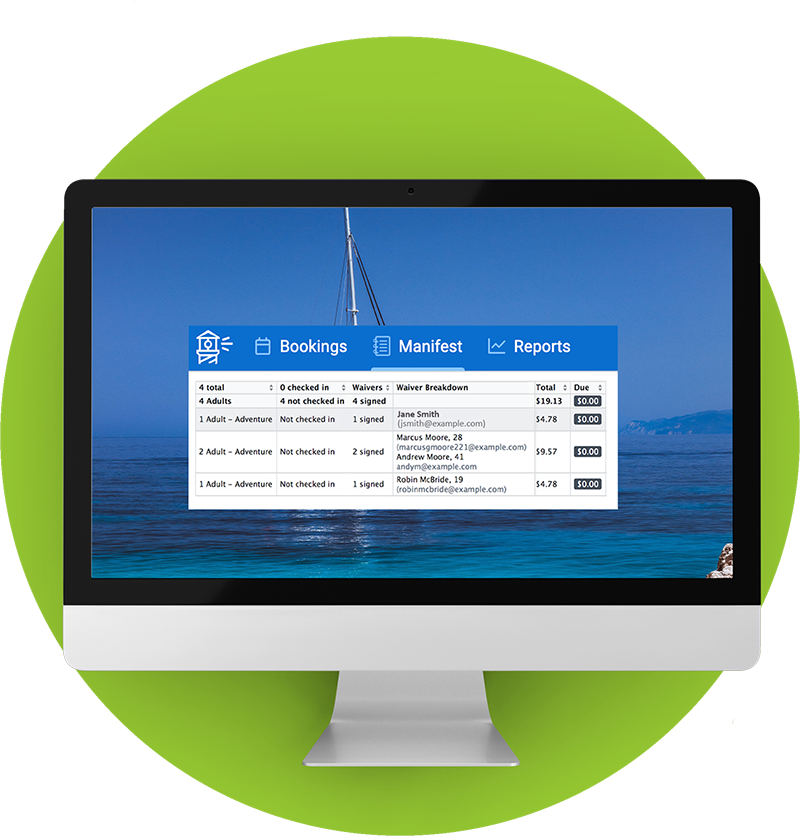
Waiver Uploads to FareHarbor Manifest
How it Works
With the Smartwaiver + FareHarbor integration, customers can sign your digital smart waiver as part of the online booking process, allowing you to seamlessly track and manage your signed waivers directly within your FareHarbor account. Complete instructions on how to integrate with FareHarbor,
Immediately after a customer books an activity online, they will receive a confirmation email that directs them to sign the waiver as the next step in the booking process.
Customer Signs Smart Waiver
Your customer is automatically directed to your digital smart waiver, which they can sign from their computer, tablet, or mobile device before they arrive. Once signed, the document is automatically added to the customer’s booking invoice.
Waiver Uploads to FareHarbor Manifest
On the FareHarbor manifest, you can see whether or not the waiver has been signed, as well as the number of people listed on the participant’s waiver. View the signed document as a PDF or directly within the Smartwaiver Waiver Console.