














Digital waiver solutions make collecting signatures quick, convenient, and secure. These tools help streamline the process of collecting liability waivers by eliminating the need to manually print, scan, and mail documents. They also provide stronger security and make it easy to find specific files by storing documents in searchable cloud databases.
Smartwaiver and DocuSign are options that organizations might consider when choosing a platform to manage electronic documents and signatures.
In this article, we’ll compare Smartwaiver and DocuSign and explore why Smartwaiver is the way to go.
DocuSign: Ideal for Legal Documents and Contracts
DocuSign is a powerful tool that allows users to share digital documents and collect e-signatures, typically via email. Its key features include:
- Smart routing: DocuSign uses an ”if-then” logic to automatically send a document for signing to the next person based on data entered by the sender or previous recipient.
- Digital taper trails: Every signed document includes a secure, legally binding certificate that logs exactly when and where it was signed.
- Integrations with other apps: It connects directly to tools you already use, like Google Workspace, Microsoft 365, and Salesforce.
DocuSign's PowerForms
DocuSign's PowerForms feature was designed to collect signatures and data outside of the usual email-based process. Instead of routing a document to a specific person, you can create a one-size-fits-all digital form and share it via a custom URL or embed it directly onto your website. This makes it a handy, catch-all solution for general intake forms, allowing anyone to click the link and sign at their own time.
Why DocuSign Might Not Be Right for You
While tools like DocuSign's PowerForms can technically get the job done for liability waivers, using them is often like trying to force a square peg into a round hole. Because DocuSign is a massive platform with many other features and form types, setting up liability waivers could be unexpectedly clunky. Plus, PowerForms aren't included in free plans—you have to upgrade to DocuSign’s Business Pro plan to access the feature.
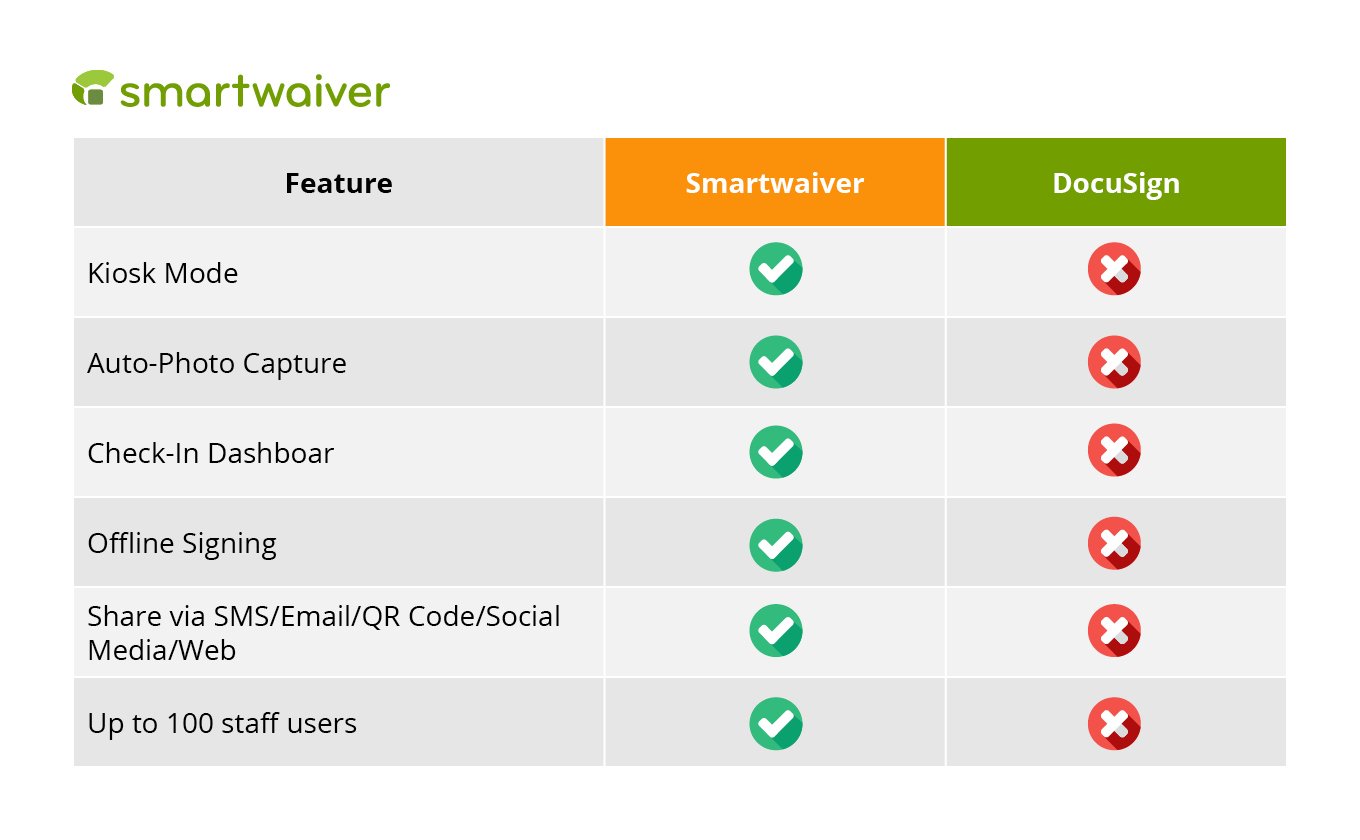
DocuSign is handy when you need to share collaborative legal documents with specific, known individuals. However, large-volume waiver collection, where an organization might need to gather hundreds of signatures a day, doesn’t align with this process. In those fast-paced environments, efficiency, organization, and simplicity are key—this is where Smartwaiver comes in.
Smartwaiver: The Best Platform for Liability Waivers
Smartwaiver is an online waiver solution that converts traditional paper forms into legally binding online documents. Our robust platform provides a host of intuitive features that let you collect, organize, and securely store legally binding digital waivers with ease.
We provide all features to all pricing plans, so you do not have to pay extra for waiver management. And because Smartwaiver is built specifically for digital waivers, you can guarantee we do it well.
Some of the features we offer include:
-
Dedicated signature kiosks: Use our waiver kiosk app to easily turn any tablet at your front desk into a designated signing station to speed up check-ins.
-
Offline signing: Even if your Wi-Fi drops, you can still collect legally binding signatures that automatically sync the moment you are back online.
-
Custom branding: You can customize your forms with your own logos and colors so they match your brand perfectly and foster trust with participants.
-
All-inclusive access: Get full access to every tool and feature right out of the gate, no matter which pricing plan you choose.
-
Auto photo capture: Easily add an extra layer of photo verification to the digital waivers participants use at your location.
-
Multimedia content embedding: Maintain safety standards by embedding instructional and training videos directly into your waiver.
-
Integrations: Boost your business efficiency with integrations to top booking platforms like Mindbody, Xola, and FareHarbor. Plus, you can automatically sync customer emails collected from your waivers straight to your favorite marketing tools, including MailChimp, Constant Contact, and Emma.
-
Robust security standards: Protect your data and your patrons through our enterprise-grade security features.
-
Reliable customer support: We provide a dedicated, U.S.-based customer support team that is accessible seven days a week via phone, email, and chat.
-
Driver’s license scanning feature: No need to manually fill out every single field! Scan your driver’s license to pre-fill standardized fields of the waiver form.
Smartwaiver provides a purpose-built solution for handling the fast-paced demands of high-volume waiver collection. Instead of wrestling with clunky workarounds for tools that aren’t designed for collecting waivers, you’ll get a streamlined, user-friendly tool that makes the signing process effortless for both your staff and your customers.
Wrapping Up
As the pioneer of digital waivers, Smartwaiver set the industry standard by transforming a cumbersome process into an elegant, seamless experience. Over a decade later, the landscape has changed, but we remain the trusted industry leader because we consistently deliver excellent and reliable service to our customers.
We’re incredibly proud of the product we've built, but we’d rather let the results do the talking. But don't just take our word for it. Jump into a free trial today and experience the Smartwaiver difference for yourself!



.png)
.png)